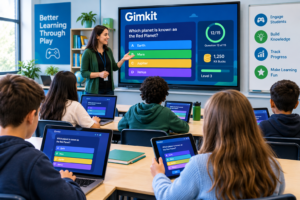
Gimkit Research Dossier: Gimkit s a game-based learning platform designed to make classroom review and assessment more interactive. Instead of presenting quizzes as simple question-and-answer activities, Gimkit combines educational questions with game mechanics such as virtual currency, upgrades, and strategic choices. This approach helps teachers turn revision sessions into more engaging learning experiences.
Originally created by student entrepreneur Josh Feinsilber, Gimkit has become a recognized example of how gamification can be applied in education. The platform allows teachers to create question sets, run live classroom games, and assign self-paced activities for students.
However, Gimkit is not simply a “fun quiz game.” Understanding how it works, where it performs well, and where it has limitations helps educators decide whether it matches their teaching goals.
This research dossier examines Gimkit’s purpose, features, classroom applications, benefits, challenges, and alternatives.
What Is Gimkit?

Gimkit is an online educational game platform that allows teachers to create interactive quiz activities called Kits. These Kits contain questions that students answer during gameplay.
Unlike traditional quiz platforms where students only collect points for correct answers, Gimkit introduces game-based systems. Students earn virtual money by answering questions correctly and can spend those earnings on upgrades and power-ups during the game.
The main idea behind Gimkit is to combine:
- Learning content
- Repetition
- Competition
- Strategy
- Student motivation
The platform is commonly used in K–12 classrooms, especially for:
- Review sessions
- Test preparation
- Vocabulary practice
- Concept reinforcement
- Formative assessment
Background and Development of Gimkit
Gimkit was created by Josh Feinsilber while he was a high school student. The original idea came from improving classroom quizzes by making them more engaging through game mechanics.
The platform developed from a simple quiz-based tool into a broader classroom learning environment with different game modes and teacher-focused features.
Today, Gimkit is positioned as an educational technology platform rather than a traditional gaming product.
How Does Gimkit Work?
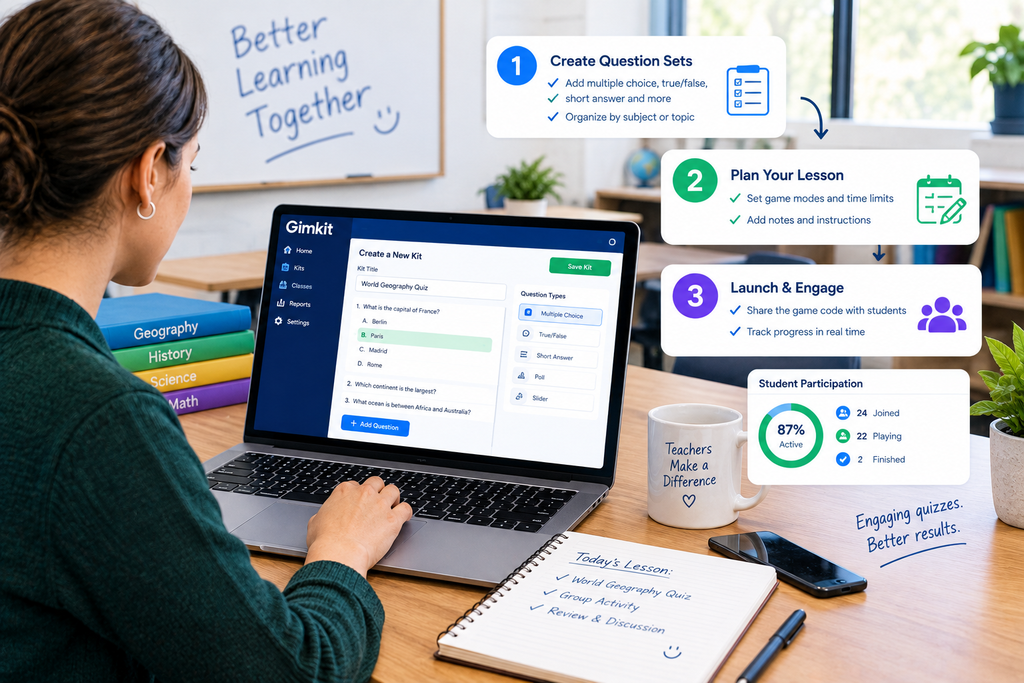
The basic Gimkit workflow includes three main steps:
1. Teacher Creates a Kit
Teachers can create question sets manually or use available tools to prepare learning activities.
A Kit can include questions related to:
- Science topics
- Mathematics
- Language learning
- History
- Vocabulary
- Exam revision
Teachers can also adapt existing resources depending on their classroom requirements.
3. Students Join the Activity
Students participate through a game session created by the teacher.
Depending on the activity type, students may:
- Join a live classroom game
- Complete an assignment independently
- Participate using a shared classroom display
3. Students Learn Through Gameplay
During gameplay, students answer questions and receive virtual rewards.
The reward system introduces strategic decisions:
- Should a student increase earning ability?
- Should they protect their current score?
- Should they invest in upgrades?
This creates a different learning experience compared with a normal quiz.
Key Features of Gimkit
1. Game-Based Quiz Learning
The central feature of Gimkit is transforming assessments into interactive games.
Students are not only trying to answer correctly; they are also managing game resources.
This can make repetitive practice activities feel more engaging.
2. Kits (Question Sets)
Kits are the foundation of Gimkit activities.
Teachers can use Kits for:
- Classroom review
- Homework
- Practice exercises
- Knowledge checks
A well-designed Kit allows teachers to align gameplay with specific learning objectives.
3. Live Games
Gimkit supports live classroom activities where students participate together.
This format works well for:
- End-of-lesson reviews
- Group competitions
- Quick knowledge checks
Teachers can use live sessions to identify areas where students need additional explanation.
4. Assignments and Self-Paced Learning
Gimkit also supports activities where students work independently.
This can be useful when teachers want students to:
- Review material at home
- Practice before exams
- Complete additional learning activities
Self-paced activities give students more control over when they complete the work.
5. Power-Ups and Upgrades
The game economy is one of Gimkit’s most distinctive features.
Students earn virtual currency and use it to purchase upgrades.
These mechanics introduce:
- Decision-making
- Risk management
- Strategic thinking
The educational value depends on how teachers connect gameplay with learning objectives.
6. KitCollab
KitCollab allows students to contribute questions to a shared quiz.
This changes students from only answering questions into active participants in creating learning material.
Possible classroom uses:
- Group projects
- Revision activities
- Peer learning exercises
Benefits of Using Gimkit in Education
Increased Student Engagement
One of Gimkit’s biggest advantages is its ability to make review sessions more interactive.
Many students are familiar with game environments, so combining questions with game mechanics can increase participation.
However, engagement depends on:
- Classroom culture
- Teacher implementation
- Student preferences
A game format alone does not automatically guarantee better learning.
Encourages Repetition and Practice
Learning often requires repeated exposure.
Gimkit’s gameplay structure encourages students to answer multiple questions during a session.
This repetition can support:
- Memory reinforcement
- Vocabulary development
- Concept review
Provides Formative Assessment Opportunities
Teachers can use Gimkit as a quick way to understand student knowledge.
For example:
A science teacher may create a Kit about cell biology before an exam.
The results can help identify:
- Topics students understand
- Common mistakes
- Areas requiring additional teaching
Makes Review Sessions More Enjoyable
Traditional revision can sometimes feel repetitive.
Adding competition and strategy can make classroom review more dynamic.
This is especially useful for:
- Exam preparation
- End-of-unit activities
- Vocabulary practice
Practical Classroom Examples of Gimkit
Example 1: Language Learning
A language teacher creates a Kit containing:
- Vocabulary questions
- Translation exercises
- Grammar concepts
Students practice repeatedly while competing through gameplay.
Example 2: Science Revision
A biology teacher uses Gimkit before a test.
Questions cover:
- Definitions
- Processes
- Key concepts
The teacher reviews incorrect answers afterward.
Example 3: History Review
Students prepare for an assessment through historical questions.
Instead of reviewing a worksheet, they participate in a structured game session.
Limitations of Gimkit
Although Gimkit provides useful classroom features, it is not suitable for every situation.
1. Game Competition May Not Suit Every Student
Some students enjoy competition, while others may feel pressure from rankings or scores.
Teachers should consider:
- Student personality differences
- Classroom environment
- Learning preferences
2. Requires Technology Access
Like most online learning platforms, Gimkit depends on:
- Internet connection
- Compatible devices
- Classroom technology availability
Schools with limited technology resources may face challenges.
3. Preparation Time
Creating meaningful question sets requires teacher effort.
A poorly designed Kit may become only a game rather than an effective learning activity.
The educational quality depends heavily on:
- Question quality
- Topic alignment
- Teacher planning
4. Not a Replacement for Teaching
Gimkit works best as a supporting tool.
It cannot replace:
- Teacher explanations
- Classroom discussions
- Practical activities
- Personalized instruction
It should be used as part of a broader teaching strategy.
Gimkit Pricing Considerations
Gimkit provides free access options and paid plans with additional features. Pricing and available features may change over time, so educators should check Gimkit’s official website for current details before making decisions.
Gimkit vs Traditional Quiz Tools
Traditional quiz platforms usually focus on:
- Questions
- Answers
- Scores
Gimkit adds:
- Game economy
- Strategic choices
- Upgrades
- Interactive competition
The difference is not only visual. Gimkit changes how students interact with practice activities.
However, some teachers may prefer simpler quiz platforms when their goal is quick assessment rather than gamified learning.
Who Should Use Gimkit?
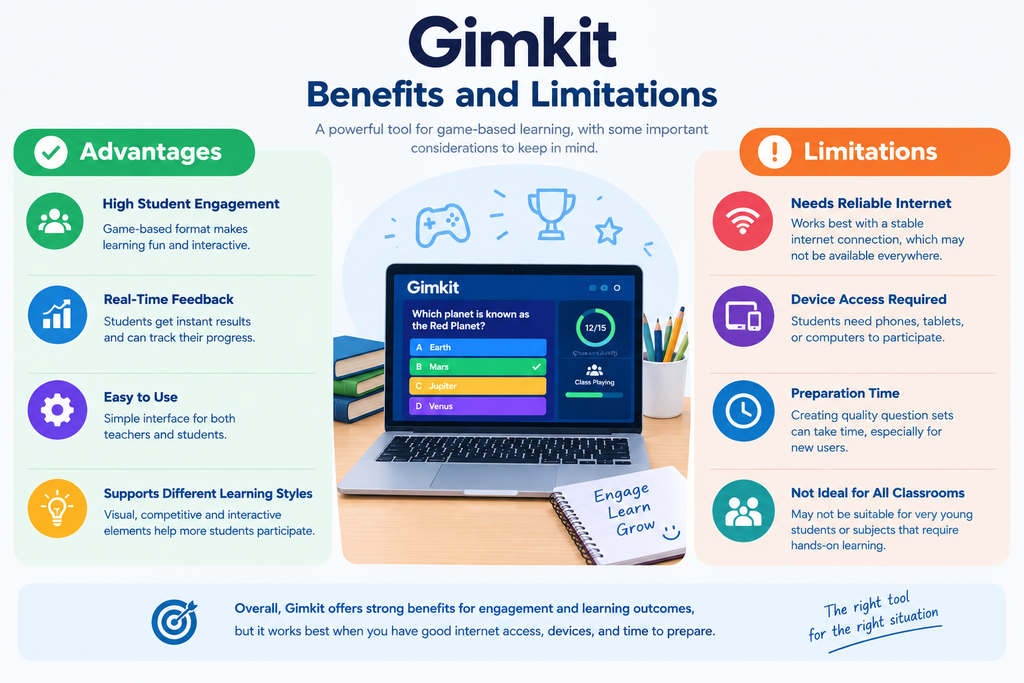
Gimkit may be a good choice for:
✓ Teachers who want interactive review activities
✓ Classrooms that respond well to gamification
✓ Students who enjoy competitive learning formats
✓ Educators looking for engaging formative assessment tools
It may be less suitable for:
✗ Learning environments without reliable technology
✗ Students who dislike competitive activities
✗ Lessons requiring deeper discussion-based learning
Final Conclusion
Gimkit represents a broader shift in educational technology: moving assessment from a passive activity into an interactive experience.
Its strongest feature is the combination of learning questions with game mechanics that encourage participation and repetition. Teachers can use it effectively for review sessions, practice activities, and classroom engagement.
However, Gimkit is most valuable when used strategically. It should support teaching—not replace explanation, discussion, or meaningful learning experiences.
For educators searching for a more engaging way to review concepts, Gimkit provides an interesting approach by combining assessment with gameplay. The best results come from thoughtful question design and using the platform as one part of a complete teaching strategy.
FAQs
What is Gimkit?
Gimkit is a game-based learning platform that allows teachers to create interactive quizzes where students answer questions, earn virtual rewards, and learn through gameplay.
Who created Gimkit?
Gimkit was created by Josh Feinsilber while he was a high school student, with the goal of making classroom learning more engaging.
How does Gimkit work?
Teachers create question sets called Kits, and students answer questions in live or assignment-based games while earning virtual currency and upgrades.
Is Gimkit free?
Gimkit offers free access options, but some advanced features may require a paid plan. Current pricing should be checked on the official Gimkit website.
What is a Kit in Gimkit?
A Kit is a collection of questions created by teachers for classroom activities, practice sessions, or student assignments.
Can Gimkit be used for homework?
Yes, teachers can assign Gimkit activities that students complete independently outside live classroom sessions.
What subjects can be taught with Gimkit?
Gimkit can be used for many subjects, including science, mathematics, languages, history, and general knowledge review.
Is Gimkit suitable for all students?
Gimkit works well for many learners, but competitive game elements may not appeal to every student or classroom environment.
How is Gimkit different from Kahoot?
Gimkit adds game mechanics like virtual currency and upgrades, while Kahoot mainly focuses on fast-paced quiz competitions.
Can teachers create their own Gimkit questions?
Yes, teachers can create custom Kits based on their lesson topics and learning objectives.
Does Gimkit replace traditional teaching?
No. Gimkit works as a supporting learning tool and is most effective when combined with teacher instruction and discussion.
What are the limitations of Gimkit?
Common limitations include the need for internet access, device availability, preparation time, and the fact that gamification may not suit every learner.